What if … MySQL’s repeatable reads cause you to lose money?
Well, let me say if that happens because there is a logic mistake in your application. But you need to know and understand what happens in MySQL to be able to avoid the problem.
In short the WHY of this article is to inform you about possible pitfalls and how to prevent that to cause you damage. 
Let us start by having a short introduction to what Repeatable reads are about. Given I am extremely lazy, I am going to use (a lot) existing documentation from MySQL documentation.
Transaction isolation is one of the foundations of database processing. Isolation is the I in the acronym ACID; the isolation level is the setting that fine-tunes the balance between performance and reliability, consistency, and reproducibility of results when multiple transactions are making changes and performing queries at the same time.
InnoDB offers all four transaction isolation levels described by the SQL:1992 standard: READ UNCOMMITTED, READ COMMITTED, REPEATABLE READ, and SERIALIZABLE. The default isolation level for InnoDB is REPEATABLE READ.
- REPEATABLE READ
This is the default isolation level for InnoDB. Consistent reads within the same transaction read the snapshot established by the first read. This means that if you issue several plain (nonlocking) SELECT statements within the same transaction, these SELECT statements are consistent also with respect to each other.
- READ COMMITTED
Each consistent read, even within the same transaction, sets and reads its own fresh snapshot.
And about Consistent Non blocking reads:
A consistent read means that InnoDB uses multi-versioning to present to a query a snapshot of the database at a point in time. The query sees the changes made by transactions that committed before that point in time, and no changes made by later or uncommitted transactions. The exception to this rule is that the query sees the changes made by earlier statements within the same transaction. This exception causes the following anomaly: If you update some rows in a table, a SELECT sees the latest version of the updated rows, but it might also see older versions of any rows. If other sessions simultaneously update the same table, the anomaly means that you might see the table in a state that never existed in the database.
Ok, but what does all this mean in practice?
To understand, let us simulate this scenario:
I have a shop and I decide to grant a bonus discount to a selected number of customers that:
- Have an active account to my shop
- Match my personal criteria to access the bonus
My application is set to perform batch operations in a moment of less traffic and unattended.
This includes reactivating dormant accounts that customers ask to reactivate.
What we will do is to see what happens, by default, then see what we can do to avoid pitfalls.
The scenario
I will use 3 different connections to connect to the same MySQL 8.0.27 instance. The only relevant setting I have modified is the Innodb_timeout that I set to 50 seconds.
- Session 1 will simulate a process that should activate the bonus feature for the selected customers.
- Session 2 is an independent process that reactivate the given list of customers
- Session 3 is used to collect lock information.
For this simple test I will use the customer table in the sakila schema modified as below:
CREATE TABLE `customer` (
  `customer_id` smallint unsigned NOT NULL AUTO_INCREMENT,
  `store_id` tinyint unsigned NOT NULL,
  `first_name` varchar(45) NOT NULL,
  `last_name` varchar(45) NOT NULL,
  `email` varchar(50) DEFAULT NULL,
  `address_id` smallint unsigned NOT NULL,
  `active` tinyint(1) NOT NULL DEFAULT '1',
  `create_date` datetime NOT NULL,
  `last_update` timestamp NULL DEFAULT CURRENT_TIMESTAMP ON UPDATE CURRENT_TIMESTAMP,
  `bonus` int NOT NULL DEFAULT '0',
  `activate_bonus` varchar(45) NOT NULL DEFAULT '0',
  PRIMARY KEY (`customer_id`),
  KEY `idx_fk_store_id` (`store_id`),
  KEY `idx_fk_address_id` (`address_id`),
  KEY `idx_last_name` (`last_name`),
  KEY `idx_bonus` (`bonus`),
  CONSTRAINT `fk_customer_address` FOREIGN KEY (`address_id`) REFERENCES `address` (`address_id`) ON DELETE RESTRICT ON UPDATE CASCADE,
  CONSTRAINT `fk_customer_store` FOREIGN KEY (`store_id`) REFERENCES `store` (`store_id`) ON DELETE RESTRICT ON UPDATE CASCADE
) ENGINE=InnoDB AUTO_INCREMENT=600 DEFAULT CHARSET=utf8mb4 COLLATE=ut
As you can see I have added the bonus and activate_bonus fields plus the idx_bonus index.
To be able to trace the locks these are the threads ids by session:
session 1 17439
session 2 17430
session 3 17443
To collect the lock information:
SELECT
    index_name, lock_type, lock_mode, lock_data, thread_id
FROM
    performance_schema.data_locks
WHERE
    object_schema = 'sakila'
        AND object_name = 'customer'
        AND lock_type = 'RECORD'
        AND thread_id IN (17439 , 17430)
ORDER BY index_name , lock_data DESC;
ok , ready? Let us start!
The run…
While the following steps can be done in a more compressed way, I prefer to do it in a more verbose way, to make it more human readable.
First let us set the environment:
session1 >set transaction_isolation = 'REPEATABLE-READ';
Query OK, 0 rows affected (0.07 sec)
session1 >Start Transaction;
Query OK, 0 rows affected (0.07 sec)
Then let see the list of the customers we will modify:
session1 >SELECT * FROM sakila.customer where bonus = 1 and active =1 order by last_name;
+-------------+----------+------------+-----------+-------+----------------+
| customer_id | store_id | first_name | last_name | bonus | activate_bonus |
+-------------+----------+------------+-----------+-------+----------------+
|         383 |        1 | MARTIN     | BALES     |     1 | 0              |
|         539 |        1 | MATHEW     | BOLIN     |     1 | 0              |
|         441 |        1 | MARIO      | CHEATHAM  |     1 | 0              |
|         482 |        1 | MAURICE    | CRAWLEY   |     1 | 0              |
|         293 |        2 | MAE        | FLETCHER  |     1 | 0              |
|          38 |        1 | MARTHA     | GONZALEZ  |     1 | 0              |
|         444 |        2 | MARCUS     | HIDALGO   |     1 | 0              |
|         252 |        2 | MATTIE     | HOFFMAN   |     1 | 0              |
|         256 |        2 | MABEL      | HOLLAND   |     1 | 0              |
|         226 |        2 | MAUREEN    | LITTLE    |     1 | 0              |
|         588 |        1 | MARION     | OCAMPO    |     1 | 0              |
|         499 |        2 | MARC       | OUTLAW    |     1 | 0              |
|         553 |        1 | MAX        | PITT      |     1 | 0              |
|         312 |        2 | MARK       | RINEHART  |     1 | 0              |
|          80 |        1 | MARILYN    | ROSS      |     1 | 0              |
|         583 |        1 | MARSHALL   | THORN     |     1 | 0              |
|         128 |        1 | MARJORIE   | TUCKER    |     1 | 0              |
|          44 |        1 | MARIE      | TURNER    |     1 | 0              |
|         267 |        1 | MARGIE     | WADE      |     1 | 0              |
|         240 |        1 | MARLENE    | WELCH     |     1 | 0              |
|         413 |        2 | MARVIN     | YEE       |     1 | 0              |
+-------------+----------+------------+-----------+-------+----------------+
21 rows in set (0.08 sec)
As you can see we have 21 customers fitting our criteria.
How much money is involved in this exercise?
session1 >SELECT
    ->     SUM(amount) income,
    ->     SUM(amount) * 0.90 income_with_bonus,
    ->    (SUM(amount) - (SUM(amount) * 0.90)) loss_because_bonus
    -> FROM
    ->     sakila.customer AS c
    ->         JOIN
    ->     sakila.payment AS p ON c.customer_id = p.customer_id
    ->     where active = 1 and bonus =1 ;
+---------+-------------------+--------------------+
| income  | income_with_bonus | loss_because_bonus |
+---------+-------------------+--------------------+
| 2416.23 |         2174.6070 |           241.6230 |
+---------+-------------------+--------------------+
This exercise is going to cost me ~242 dollars. Keep this number in mind.
What locks do I have at this point?
session3 >select index_name, lock_type, lock_mode,lock_data from performance_schema.data_locks where  object_schema = 'sakila' and object_name = 'customer' and lock_type = 'RECORD'  and
thread_id in (17439,17430) order by index_name, lock_data desc;
Empty set (0.00 sec)
Answer is none.
Meanwhile we have the other process that needs to reactivate the customers:
session2 >set transaction_isolation = 'REPEATABLE-READ';
Query OK, 0 rows affected (0.00 sec)

session2 >Start Transaction;
Query OK, 0 rows affected (0.00 sec)

session2 >SELECT * FROM sakila.customer where bonus = 1 and active =0 ;
+-------------+----------+------------+-----------+-------+----------------+
| customer_id | store_id | first_name | last_name | bonus | activate_bonus |
+-------------+----------+------------+-----------+-------+----------------+
|           1 |        1 | MARY       | SMITH     |     1 | 0              |
|           7 |        1 | MARIA      | MILLER    |     1 | 0              |
|           9 |        2 | MARGARET   | MOORE     |     1 | 0              |
|         178 |        2 | MARION     | SNYDER    |     1 | 0              |
|         236 |        1 | MARCIA     | DEAN      |     1 | 0              |
|         246 |        1 | MARIAN     | MENDOZA   |     1 | 0              |
|         254 |        2 | MAXINE     | SILVA     |     1 | 0              |
|         257 |        2 | MARSHA     | DOUGLAS   |     1 | 0              |
|         323 |        2 | MATTHEW    | MAHAN     |     1 | 0              |
|         408 |        1 | MANUEL     | MURRELL   |     1 | 0              |
+-------------+----------+------------+-----------+-------+----------------+
10 rows in set (0.00 sec)
In this case the process needs to reactivate 10 users.
session2 >update sakila.customer set active = 1 where bonus = 1 and active =0 ;
Query OK, 10 rows affected (0.00 sec)
Rows matched: 10  Changed: 10  Warnings: 0
session2 >commit;
Query OK, 0 rows affected (0.00 sec)
All good, right? But before going ahead let us double check, session 1:
session1 >SELECT * FROM sakila.customer where bonus = 1 and active =1 order by last_name;
+-------------+----------+------------+-----------+-------+----------------+
| customer_id | store_id | first_name | last_name | bonus | activate_bonus |
+-------------+----------+------------+-----------+-------+----------------+
|         383 |        1 | MARTIN     | BALES     |     1 | 0              |
|         539 |        1 | MATHEW     | BOLIN     |     1 | 0              |
|         441 |        1 | MARIO      | CHEATHAM  |     1 | 0              |
|         482 |        1 | MAURICE    | CRAWLEY   |     1 | 0              |
|         293 |        2 | MAE        | FLETCHER  |     1 | 0              |
|          38 |        1 | MARTHA     | GONZALEZ  |     1 | 0              |
|         444 |        2 | MARCUS     | HIDALGO   |     1 | 0              |
|         252 |        2 | MATTIE     | HOFFMAN   |     1 | 0              |
|         256 |        2 | MABEL      | HOLLAND   |     1 | 0              |
|         226 |        2 | MAUREEN    | LITTLE    |     1 | 0              |
|         588 |        1 | MARION     | OCAMPO    |     1 | 0              |
|         499 |        2 | MARC       | OUTLAW    |     1 | 0              |
|         553 |        1 | MAX        | PITT      |     1 | 0              |
|         312 |        2 | MARK       | RINEHART  |     1 | 0              |
|          80 |        1 | MARILYN    | ROSS      |     1 | 0              |
|         583 |        1 | MARSHALL   | THORN     |     1 | 0              |
|         128 |        1 | MARJORIE   | TUCKER    |     1 | 0              |
|          44 |        1 | MARIE      | TURNER    |     1 | 0              |
|         267 |        1 | MARGIE     | WADE      |     1 | 0              |
|         240 |        1 | MARLENE    | WELCH     |     1 | 0              |
|         413 |        2 | MARVIN     | YEE       |     1 | 0              |
+-------------+----------+------------+-----------+-------+----------------+
21 rows in set (0.08 sec)
Perfect! My Repeatable Read still sees the same snapshot. Let me apply the changes:
session1 >update sakila.customer set activate_bonus=1 where bonus = 1 and active =1 ;
Query OK, 31 rows affected (0.06 sec)
Rows matched: 31  Changed: 31  Warnings: 0
Wait, what? My list reports 21 entries, but I have modified 31! And if I check the cost:
session1 >SELECT
    ->     SUM(amount) income,
    ->     SUM(amount) * 0.90 income_with_bonus,
    ->    (SUM(amount) - (SUM(amount) * 0.90)) loss_because_bonus
    -> FROM
    ->     sakila.customer AS c
    ->         JOIN
    ->     sakila.payment AS p ON c.customer_id = p.customer_id
    ->     where active = 1 and bonus =1 ;
+---------+-------------------+--------------------+
| income  | income_with_bonus | loss_because_bonus |
+---------+-------------------+--------------------+
| 3754.01 |         3378.6090 |           375.4010 |
+---------+-------------------+--------------------+
Well now the cost of this operation is 375 dollars not 242. In this case we are talking about peanuts, but guess what could be if we do something similar on thousands of users.
Anyhow let us first:
session1 >rollback;
Query OK, 0 rows affected (0.08 sec)
And cancel the operation.
So what happened, is this a bug?
No it is not! It is how repeatable reads work in MySQL. The snapshot is relevant to the read operation, But if another session is able to write given also the absence of lock at the moment of reads, the next update operation will touch any value in the table matching the conditions.
As shown above this can be very dangerous. But only if you don’t do the right things in the code.
How can I prevent this from happening?
When coding, hope for the best, plan for the worse, always! Especially when dealing with databases. That approach may save you from spending nights trying to fix the impossible.
So how can this be prevented? You have two ways, both simple, but both with positive and negative consequences.
- Add this simple clausole to the select statement: for share
- Add the other simple clausole to the select statement: for update
- Use Read-committed
Solution 1 is easy and clean, no other change in the code. BUT create locks, and if your application is lock sensitive this may be an issue for you.
Solution 2 is also easy, but a bit more encapsulated and locking.
On the other hand Solution 3 does not add locks, but requires modifications in the code and it still leaves some space for problems.
Let us see them in detail.
Solution 1
Let us repeat the same steps
session1 >set transaction_isolation = 'REPEATABLE-READ';
session1 >Start Transaction;
session1 >SELECT * FROM sakila.customer where bonus = 1 and active =1 order by last_name for share;
If now we check the locks for brevity I have cut some entries and kept a few as a sample:
session3 >select index_name, lock_type, lock_mode,lock_data,thread_id from performance_schema.data_locks where
    -> object_schema = 'sakila'
    -> and object_name = 'customer'
    -> and lock_type = 'RECORD'
    -> and thread_id = 17439
    -> order by index_name, lock_data desc;
+------------+-----------+---------------+------------------------+-----------+
| index_name | lock_type | lock_mode     | lock_data              | thread_id |
+------------+-----------+---------------+------------------------+-----------+
| idx_bonus  | RECORD    | S             | supremum pseudo-record |     17439 |
| idx_bonus  | RECORD    | S             | 1, 9                   |     17439 |
<snip>
| idx_bonus  | RECORD    | S             | 1, 128                 |     17439 |
| idx_bonus  | RECORD    | S             | 1, 1                   |     17439 |
| PRIMARY    | RECORD    | S,REC_NOT_GAP | 9                      |     17439 |
<snip>
| PRIMARY    | RECORD    | S,REC_NOT_GAP | 1                      |     17439 |
+------------+-----------+---------------+------------------------+-----------+
63 rows in set (0.00 sec)
This time we can see that the select has raised a few locks all in S (shared) mode.
For brevity I am skipping to report exactly the same results as in the first exercise.
If we go ahead and try with session 2:
session2 >set transaction_isolation = 'READ-COMMITTED';
session2 >Start Transaction;
session2 >SELECT * FROM sakila.customer where bonus = 1 and active =0 ;
session2 >update sakila.customer set active = 1 where bonus = 1 and active =0 ;
ERROR 1205 (HY000): Lock wait timeout exceeded; try restarting transaction
Here we go! Attempting to change the values in the customer table is now on hold waiting to acquire the lock. If the duration exceeds the Innodb_wait_timeout, then the execution is interrupted and the application must have a try-catch mechanism to retry the operation. This last one is a best practice that you should already have in place in your code. If not, well add it now!
At this point session 1 can proceed and complete the operations. After that and before the final commit, we will be able to observe:
+------------+-----------+---------------+------------------------+-----------+
| index_name | lock_type | lock_mode     | lock_data              | thread_id |
+------------+-----------+---------------+------------------------+-----------+
| idx_bonus  | RECORD    | S             | supremum pseudo-record |     17439 |
| idx_bonus  | RECORD    | X             | supremum pseudo-record |     17439 |
| idx_bonus  | RECORD    | S             | 1, 9                   |     17439 |
| idx_bonus  | RECORD    | X             | 1, 9                   |     17439 |
<snip>
| idx_bonus  | RECORD    | X             | 1, 1                   |     17439 |
| idx_bonus  | RECORD    | S             | 1, 1                   |     17439 |
| PRIMARY    | RECORD    | X,REC_NOT_GAP | 9                      |     17439 |
| PRIMARY    | RECORD    | S,REC_NOT_GAP | 9                      |     17439 |
<snip>|
| PRIMARY    | RECORD    | X,REC_NOT_GAP | 1                      |     17439 |
| PRIMARY    | RECORD    | S,REC_NOT_GAP | 1                      |     17439 |
+------------+-----------+---------------+------------------------+-----------+
126 rows in set (0.00 sec)
As you can see we now have two different lock types, the Shared one from the select, and the exclusive lock (X) from the update.
Solution 2
In this case we just change the kind of lock we set on the select. In solution 1 we opt for a shared lock, which allows other sessions to eventually acquire another shared lock. Here we go for an exclusive lock that will put all the other operations on hold.
session1 >set transaction_isolation = 'REPEATABLE-READ';
session1 >Start Transaction;
session1 >SELECT * FROM sakila.customer where bonus = 1 and active =1 order by last_name for UPDATE;
If now we check the locks for brevity I have cut some entries and kept few as a sample:
session3 >select index_name, lock_type, lock_mode,lock_data,thread_id from performance_schema.data_locks where
    -> object_schema = 'sakila'
    -> and object_name = 'customer'
    -> and lock_type = 'RECORD'
    -> and thread_id = 17439
    -> order by index_name, lock_data desc;
+------------+-----------+---------------+------------------------+-----------+
| index_name | lock_type | lock_mode     | lock_data              | thread_id |
+------------+-----------+---------------+------------------------+-----------+
| idx_bonus  | RECORD    | X             | supremum pseudo-record |     17439 |
| idx_bonus  | RECORD    | X             | 1, 9                   |     17439 |
<snip>
| idx_bonus  | RECORD    | X             | 1, 128                 |     17439 |
| idx_bonus  | RECORD    | X             | 1, 1                   |     17439 |
| PRIMARY    | RECORD    | X,REC_NOT_GAP | 9                      |     17439 |
| PRIMARY    | RECORD    | X,REC_NOT_GAP | 80                     |     17439 |
<snip>
| PRIMARY    | RECORD    | X,REC_NOT_GAP | 128                    |     17439 |
| PRIMARY    | RECORD    | X,REC_NOT_GAP | 1                      |     17439 |
+------------+-----------+---------------+------------------------+-----------+
63 rows in set (0.09 sec)
In this case the kind of lock is X as exclusive, so the other operations when requesting a lock must wait for this transaction to complete.
session2 >#set transaction_isolation = 'READ-COMMITTED';
session2 >
session2 >Start Transaction;
Query OK, 0 rows affected (0.06 sec)

session2 >SELECT * FROM sakila.customer where bonus = 1 and active =0 for update;
And it will wait for N time where N is either the Innodb_lock_wait_timeout or the commit time from season 1.
Note the lock request on hold:
+------------+-----------+---------------+------------------------+-----------+
| index_name | lock_type | lock_mode     | lock_data              | thread_id |
+------------+-----------+---------------+------------------------+-----------+
| idx_bonus  | RECORD    | X             | supremum pseudo-record |     17439 |
<snip>
| idx_bonus  | RECORD    | X             | 1, 128                 |     17439 |
| idx_bonus  | RECORD    | X             | 1, 1                   |     17430 |<--
| idx_bonus  | RECORD    | X             | 1, 1                   |     17439 |
| PRIMARY    | RECORD    | X,REC_NOT_GAP | 9                      |     17439 |
<snip>
| PRIMARY    | RECORD    | X,REC_NOT_GAP | 1                      |     17439 |
+------------+-----------+---------------+------------------------+-----------+
64 rows in set (0.09 sec)
Session 2 is trying to lock exclusively the idx_bonus but cannot proceed.
Once session 1 goes ahead we have:
session1 >update sakila.customer set activate_bonus=1 where bonus = 1 and active =1 ;
Query OK, 0 rows affected (0.06 sec)
Rows matched: 21  Changed: 0  Warnings: 0

session1 >
session1 >SELECT * FROM sakila.customer where bonus = 1 and active =1 ;
+-------------+----------+------------+-----------+-------+----------------+
| customer_id | store_id | first_name | last_name | bonus | activate_bonus |
+-------------+----------+------------+-----------+-------+----------------+
|          38 |        1 | MARTHA     | GONZALEZ  |     1 | 1              |
|          44 |        1 | MARIE      | TURNER    |     1 | 1              |
|          80 |        1 | MARILYN    | ROSS      |     1 | 1              |
|         128 |        1 | MARJORIE   | TUCKER    |     1 | 1              |
|         226 |        2 | MAUREEN    | LITTLE    |     1 | 1              |
|         240 |        1 | MARLENE    | WELCH     |     1 | 1              |
|         252 |        2 | MATTIE     | HOFFMAN   |     1 | 1              |
|         256 |        2 | MABEL      | HOLLAND   |     1 | 1              |
|         267 |        1 | MARGIE     | WADE      |     1 | 1              |
|         293 |        2 | MAE        | FLETCHER  |     1 | 1              |
|         312 |        2 | MARK       | RINEHART  |     1 | 1              |
|         383 |        1 | MARTIN     | BALES     |     1 | 1              |
|         413 |        2 | MARVIN     | YEE       |     1 | 1              |
|         441 |        1 | MARIO      | CHEATHAM  |     1 | 1              |
|         444 |        2 | MARCUS     | HIDALGO   |     1 | 1              |
|         482 |        1 | MAURICE    | CRAWLEY   |     1 | 1              |
|         499 |        2 | MARC       | OUTLAW    |     1 | 1              |
|         539 |        1 | MATHEW     | BOLIN     |     1 | 1              |
|         553 |        1 | MAX        | PITT      |     1 | 1              |
|         583 |        1 | MARSHALL   | THORN     |     1 | 1              |
|         588 |        1 | MARION     | OCAMPO    |     1 | 1              |
+-------------+----------+------------+-----------+-------+----------------+
21 rows in set (0.08 sec)

session1 >SELECT      SUM(amount) income,     SUM(amount) * 0.90 income_with_bonus,    (SUM(amount) - (SUM(amount) * 0.90)) loss_because_bonus FROM     sakila.customer AS c         JOIN     sakila.payment AS p ON c.customer_id = p.customer_id     where active = 1 and bonus =1;
+---------+-------------------+--------------------+
| income  | income_with_bonus | loss_because_bonus |
+---------+-------------------+--------------------+
| 2416.23 |         2174.6070 |           241.6230 |
+---------+-------------------+--------------------+
1 row in set (0.06 sec)
Now my update matches the expectations and the other operations are on hold.
After session 1 commits.
session2 >SELECT * FROM sakila.customer where bonus = 1 and active =0 for update;
+-------------+----------+------------+-----------+-------+----------------+
| customer_id | store_id | first_name | last_name | bonus | activate_bonus |
+-------------+----------+------------+-----------+-------+----------------+
|           1 |        1 | MARY       | SMITH     |     1 | 1              |
|           7 |        1 | MARIA      | MILLER    |     1 | 1              |
|           9 |        2 | MARGARET   | MOORE     |     1 | 1              |
|         178 |        2 | MARION     | SNYDER    |     1 | 1              |
|         236 |        1 | MARCIA     | DEAN      |     1 | 1              |
|         246 |        1 | MARIAN     | MENDOZA   |     1 | 1              |
|         254 |        2 | MAXINE     | SILVA     |     1 | 1              |
|         257 |        2 | MARSHA     | DOUGLAS   |     1 | 1              |
|         323 |        2 | MATTHEW    | MAHAN     |     1 | 1              |
|         408 |        1 | MANUEL     | MURRELL   |     1 | 1              |
+-------------+----------+------------+-----------+-------+----------------+
10 rows in set (52.72 sec) <-- Note the time!

session2 >update sakila.customer set active = 1 where bonus = 1 and active =0 ;
Query OK, 10 rows affected (0.06 sec)
Rows matched: 10  Changed: 10  Warnings: 0
Session 2 is able to complete BUT it was on hold for 52 seconds waiting for session 1.
As said this solution is a good one if you can afford locks and waiting time.
Solution 3
In this case we will use a different isolation model that will allow session 1 to see what session 2 has modified.
session1 >set transaction_isolation = 'READ-COMMITTED';
session1 >Start Transaction;
session1 >SELECT * FROM sakila.customer where bonus = 1 and active =1 order by last_name;
+-------------+----------+------------+-----------+-------+----------------+
| customer_id | store_id | first_name | last_name | bonus | activate_bonus |
+-------------+----------+------------+-----------+-------+----------------+
|         383 |        1 | MARTIN     | BALES     |     1 | 0              |
|         539 |        1 | MATHEW     | BOLIN     |     1 | 0              |
|         441 |        1 | MARIO      | CHEATHAM  |     1 | 0              |
|         482 |        1 | MAURICE    | CRAWLEY   |     1 | 0              |
|         293 |        2 | MAE        | FLETCHER  |     1 | 0              |
|          38 |        1 | MARTHA     | GONZALEZ  |     1 | 0              |
|         444 |        2 | MARCUS     | HIDALGO   |     1 | 0              |
|         252 |        2 | MATTIE     | HOFFMAN   |     1 | 0              |
|         256 |        2 | MABEL      | HOLLAND   |     1 | 0              |
|         226 |        2 | MAUREEN    | LITTLE    |     1 | 0              |
|         588 |        1 | MARION     | OCAMPO    |     1 | 0              |
|         499 |        2 | MARC       | OUTLAW    |     1 | 0              |
|         553 |        1 | MAX        | PITT      |     1 | 0              |
|         312 |        2 | MARK       | RINEHART  |     1 | 0              |
|          80 |        1 | MARILYN    | ROSS      |     1 | 0              |
|         583 |        1 | MARSHALL   | THORN     |     1 | 0              |
|         128 |        1 | MARJORIE   | TUCKER    |     1 | 0              |
|          44 |        1 | MARIE      | TURNER    |     1 | 0              |
|         267 |        1 | MARGIE     | WADE      |     1 | 0              |
|         240 |        1 | MARLENE    | WELCH     |     1 | 0              |
|         413 |        2 | MARVIN     | YEE       |     1 | 0              |
+-------------+----------+------------+-----------+-------+----------------+
21 rows in set (0.08 sec)
Same result as before. Now let us execute commands in session2:
session2 >set transaction_isolation = 'READ-COMMITTED';
Query OK, 0 rows affected (0.00 sec)

session2 >
session2 >Start Transaction;
Query OK, 0 rows affected (0.00 sec)

session2 >SELECT * FROM sakila.customer where bonus = 1 and active =0 ;
+-------------+----------+------------+-----------+-------+----------------+
| customer_id | store_id | first_name | last_name | bonus | activate_bonus |
+-------------+----------+------------+-----------+-------+----------------+
|           1 |        1 | MARY       | SMITH     |     1 | 0              |
|           7 |        1 | MARIA      | MILLER    |     1 | 0              |
|           9 |        2 | MARGARET   | MOORE     |     1 | 0              |
|         178 |        2 | MARION     | SNYDER    |     1 | 0              |
|         236 |        1 | MARCIA     | DEAN      |     1 | 0              |
|         246 |        1 | MARIAN     | MENDOZA   |     1 | 0              |
|         254 |        2 | MAXINE     | SILVA     |     1 | 0              |
|         257 |        2 | MARSHA     | DOUGLAS   |     1 | 0              |
|         323 |        2 | MATTHEW    | MAHAN     |     1 | 0              |
|         408 |        1 | MANUEL     | MURRELL   |     1 | 0              |
+-------------+----------+------------+-----------+-------+----------------+
10 rows in set (0.00 sec)
session2 >update sakila.customer set active = 1 where bonus = 1 and active =0 ;
Query OK, 10 rows affected (0.00 sec)
Rows matched: 10  Changed: 10  Warnings: 0

session2 >commit;
Query OK, 0 rows affected (0.00 sec)
All seems the same, but if we check again in session 1:
session1 >SELECT * FROM sakila.customer where bonus = 1 and active =1 order by last_name;
+-------------+----------+------------+-----------+------+----------------+
| customer_id | store_id | first_name | last_name |bonus | activate_bonus |
+-------------+----------+------------+-----------+------+----------------+
|         383 |        1 | MARTIN     | BALES     |    1 | 1              |
|         539 |        1 | MATHEW     | BOLIN     |    1 | 1              |
|         441 |        1 | MARIO      | CHEATHAM  |    1 | 1              |
|         482 |        1 | MAURICE    | CRAWLEY   |    1 | 1              |
|         236 |        1 | MARCIA     | DEAN      |    1 | 0              |
|         257 |        2 | MARSHA     | DOUGLAS   |    1 | 0              |
|         293 |        2 | MAE        | FLETCHER  |    1 | 1              |
|          38 |        1 | MARTHA     | GONZALEZ  |    1 | 1              |
|         444 |        2 | MARCUS     | HIDALGO   |    1 | 1              |
|         252 |        2 | MATTIE     | HOFFMAN   |    1 | 1              |
|         256 |        2 | MABEL      | HOLLAND   |    1 | 1              |
|         226 |        2 | MAUREEN    | LITTLE    |    1 | 1              |
|         323 |        2 | MATTHEW    | MAHAN     |    1 | 0              |
|         246 |        1 | MARIAN     | MENDOZA   |    1 | 0              |
|           7 |        1 | MARIA      | MILLER    |    1 | 0              |
|           9 |        2 | MARGARET   | MOORE     |    1 | 0              |
|         408 |        1 | MANUEL     | MURRELL   |    1 | 0              |
|         588 |        1 | MARION     | OCAMPO    |    1 | 1              |
|         499 |        2 | MARC       | OUTLAW    |    1 | 1              |
|         553 |        1 | MAX        | PITT      |    1 | 1              |
|         312 |        2 | MARK       | RINEHART  |    1 | 1              |
|          80 |        1 | MARILYN    | ROSS      |    1 | 1              |
|         254 |        2 | MAXINE     | SILVA     |    1 | 0              |
|           1 |        1 | MARY       | SMITH     |    1 | 0              |
|         178 |        2 | MARION     | SNYDER    |    1 | 0              |
|         583 |        1 | MARSHALL   | THORN     |    1 | 1              |
|         128 |        1 | MARJORIE   | TUCKER    |    1 | 1              |
|          44 |        1 | MARIE      | TURNER    |    1 | 1              |
|         267 |        1 | MARGIE     | WADE      |    1 | 1              |
|         240 |        1 | MARLENE    | WELCH     |    1 | 1              |
|         413 |        2 | MARVIN     | YEE       |    1 | 1              |
+-------------+----------+------------+-----------+------+----------------+
31 rows in set (0.09 sec)
We now can see all the 31 customers and also the value calculation:
+---------+-------------------+--------------------+
| income  | income_with_bonus | loss_because_bonus |
+---------+-------------------+--------------------+
| 3754.01 |         3378.6090 |           375.4010 |
+---------+-------------------+--------------------+
Is reporting the right values.
At this point we can program some logic in the process to check the possible tolerance, and have the process either complete performing the update operations or to stop the process and exit.
This as mentioned requires additional coding and more logic.
To be fully honest, this solution still leaves space to some possible interference, but at least allow the application to be informed about what is happening. Still it should be used only if you cannot afford to have a higher level of locking, but this is another story/article.
Conclusions
When writing applications that interact with a RDBMS, you must be very careful in what you do and HOW you do it. While using data facilitation layers like Object Relational Mapping (ORM), seems to make your life easier, in reality you may lose control on a few crucial aspects of the application’s interaction. So be very careful when opting for how to access your data.
About the case reported above we can summarize a few pitfalls:
- First and most important, never ever have processes that may interfere with the one running at the same time. Be very careful when you design them and even more careful when planning their executions.
- Use options such as for share or for update in your select statements. Use them carefully to avoid unuseful locks, but use them.
- In case you have a long process that requires modifying data, and you need to be able to check if other processes have altered the status of the data, but at the same time, cannot have a long wait time for locks. Then use a mix, setting READ-COMMITTED as isolation, to allow your application to check, but also add things like for share or for update in the select statement, immediately before the DML and the commit. That will allow you to prevent writes while you are finalizing, and also to significantly reduce the locking time.
- Keep in mind that long running processes and long running transactions can be the source of a lot of pain, especially when using REPEATABLE-READ. Try whenever you can to split the operations in small chunks.
Finally when developing, remember that DBAs are friends, and are there to help you to do the things at the best. It may seem they are giving you a hard time, but that is because their point of view is different, focusing on data consistency, availability and durability. But they can help you to save a lot of time after the code is released, especially when you try to identify why something has gone wrong.
So involve them soon in the design process, use them and let them be part of the process.
References
https://dev.mysql.com/doc/refman/8.0/en/innodb-transaction-isolation-levels.html
https://dev.mysql.com/doc/refman/8.0/en/innodb-consistent-read.html
https://dev.mysql.com/doc/refman/8.0/en/innodb-transaction-model.html


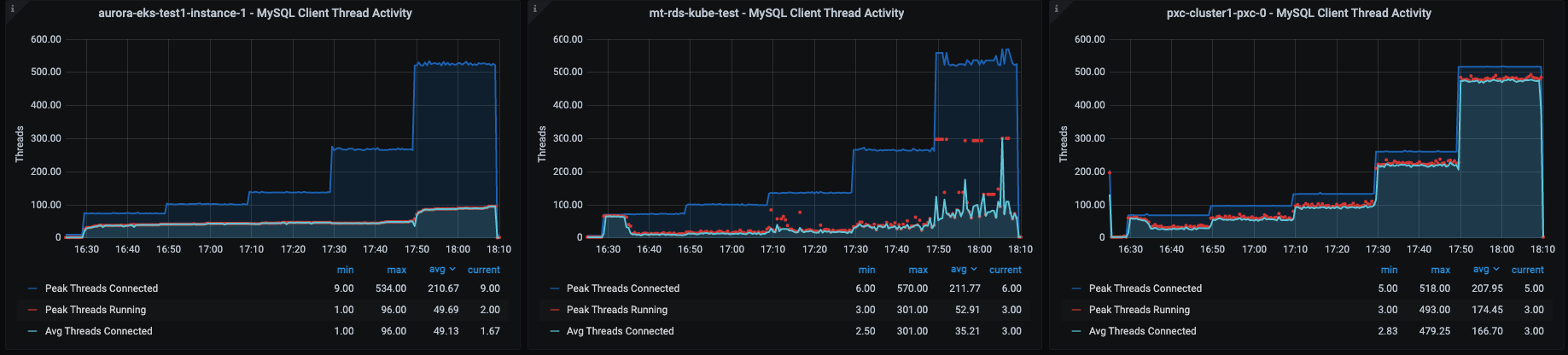
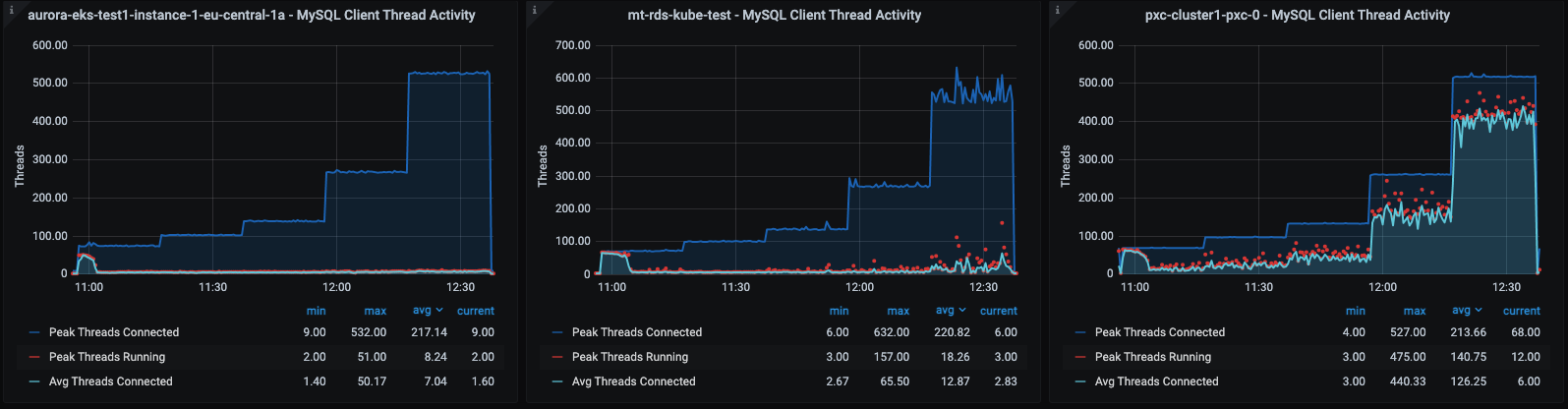
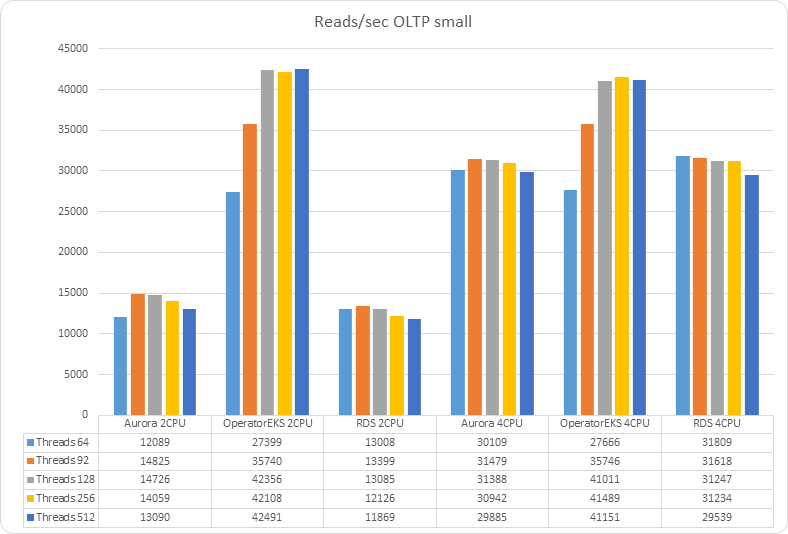
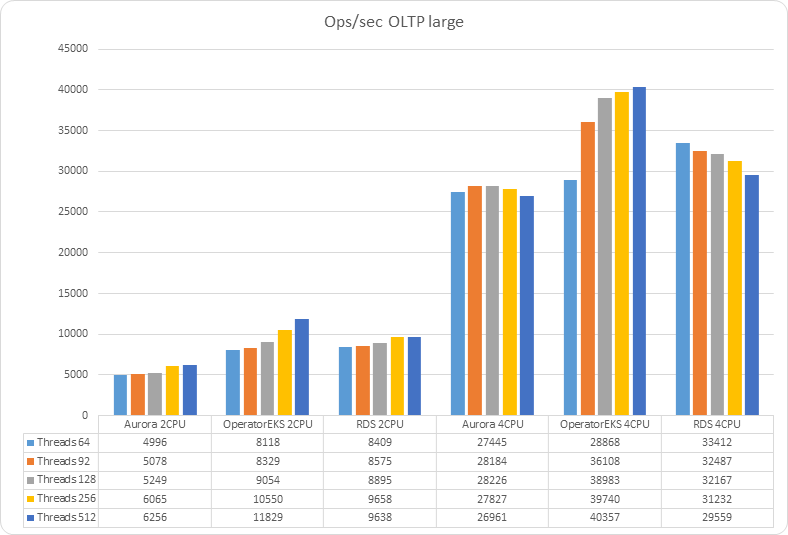
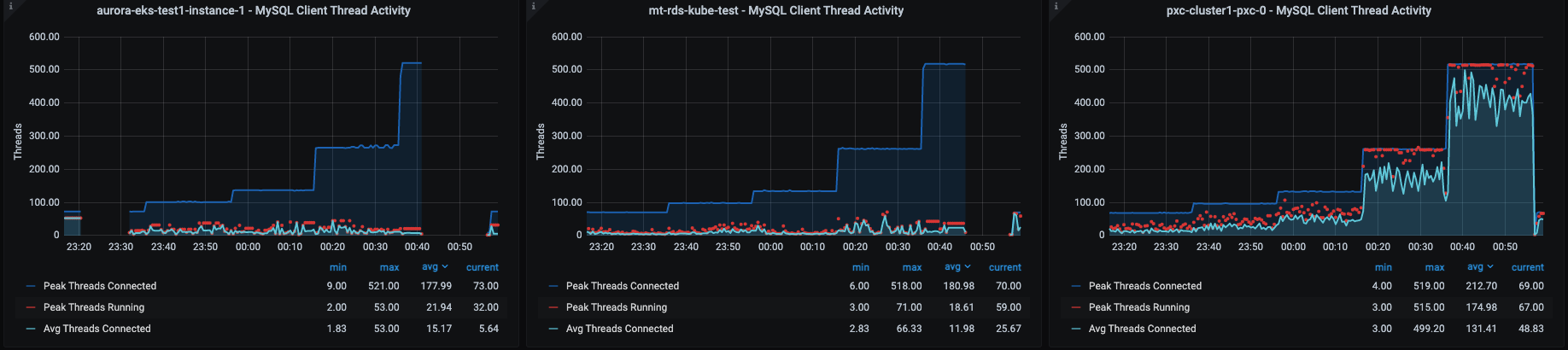
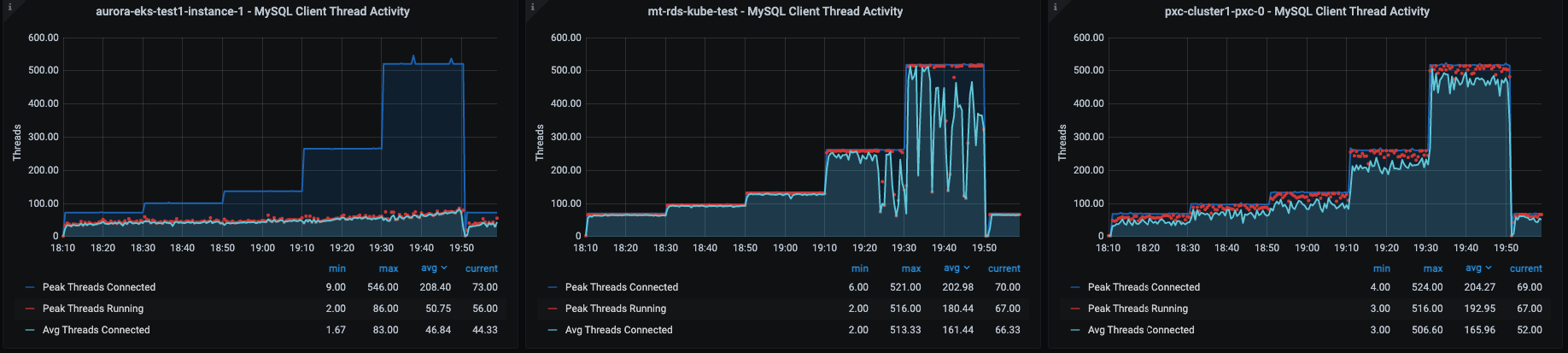
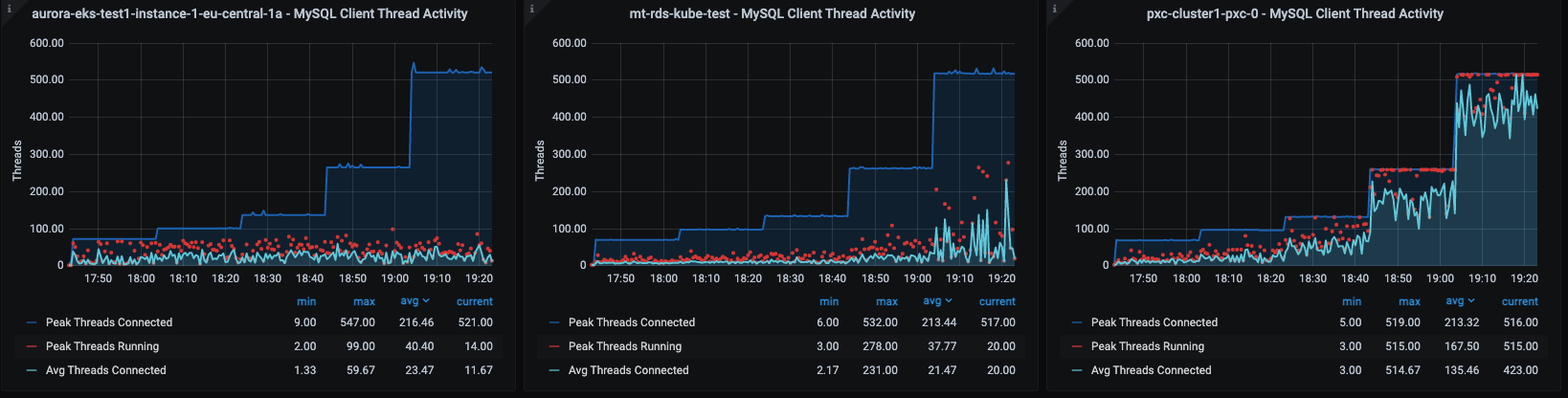
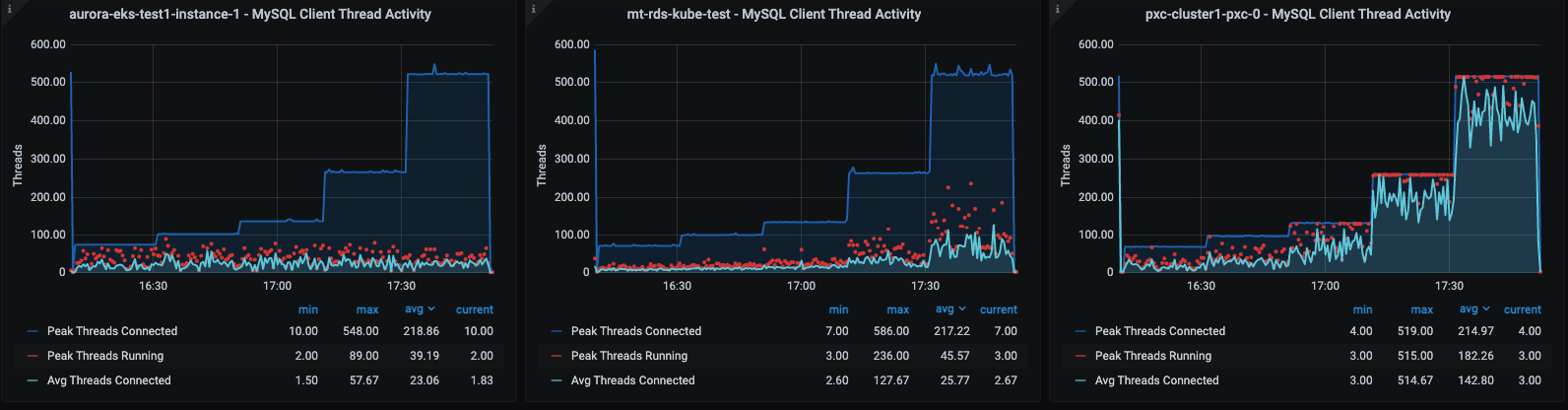
 siness or a new project inside an enterprise. We were also wondering how it behaves in relation to already well established solutions, like Amazon RDS or Google SQL.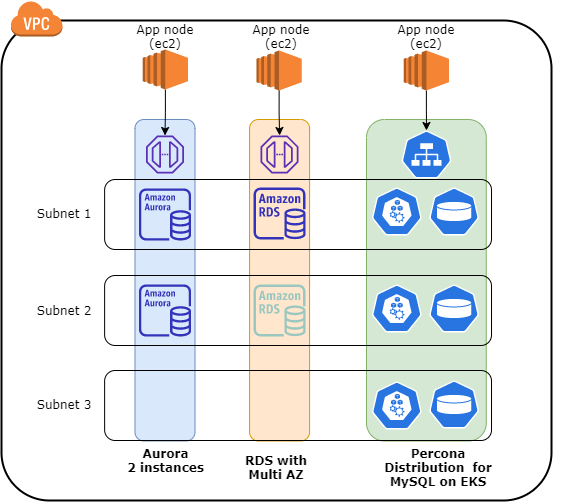
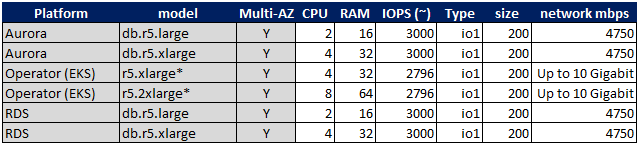













-OLTP-small-_20.png)
-OLTP-large_19.png)


-TPCC-small-_22.png)
-TPCC-large_21.png)